Features

From Shopify data to the finished file, in five steps.

This page lists what DataChamp can do, in the order you use it: pick the data, shape the file, filter it, choose the format, deliver it.

1 · Pick the data

Every field in your shop, including metafields

Start from a template or an empty report, search for a field and add it as a column. Hundreds of Shopify fields are available across all major data types.

Orders
Financial and fulfillment status, line items with SKUs, prices, discounts and taxes, shipping lines, refunds, transactions, tracking numbers, notes and tags. Draft orders too.
Products and inventory
Titles, vendors, types, tags and SEO fields; variants with SKUs, barcodes, options, prices and weights; stock per location; collections.
Customers
Names, addresses, total spent, number of orders, tags, notes and marketing consent.
Payouts and transactions
Shopify payouts and the transactions behind them, for reconciliation and accounting.
Metafields
From orders, line items, products, variants, customers and collections. Each metafield becomes its own column and can be used in filters.

2 · Shape the file

Columns, codes and rows exactly as the target system wants them

This is where DataChamp differs from a plain export. You change the file until the import on the other side runs without manual fixes.

  • ✓Rename and reorder columns by drag and drop
  • ✓Custom columns with fixed text or several fields combined
  • ✓Calculated fields: arithmetic, text functions, date and number formats
  • ✓If-then mappings that translate values into the codes your system expects
  • ✓Excel formulas that stay live in the exported file
  • ✓Extra rows and aggregations for shipping lines, header rows and sums
  • ✓Templates for common exports, and your own reports saved, duplicated and shared between shops
Tutorials in the help center →

3 · Filter

Only the records the receiver should get

Combine as many conditions as you need. With incremental exports, each run only contains what is new or changed since the last one.

  • ✓Several conditions combined with AND and OR
  • ✓Relative date ranges such as “yesterday” or “last month”, or fixed dates
  • ✓Filter by almost any Shopify field and by metafield values
  • ✓Operators: equals, contains, starts with, greater than, is empty and their opposites
  • ✓Incremental exports: only new or updated records since the last run

4 · Format

The technical details older systems are strict about

Many imports fail on a delimiter or an umlaut. DataChamp lets you set these details per report.

  • ✓Excel (XLSX), CSV and text files, or straight into Google Sheets
  • ✓CSV options: comma, semicolon, tab or pipe as delimiter, and control over text quoting
  • ✓Character encoding: UTF-8 with or without BOM, ISO-8859-1, Windows-1252 and others
  • ✓File names from your own pattern, for example with the date
  • ✓Header row on or off, and line endings as CRLF or LF
  • ✓One file per order, customer or product when the receiver needs separate files

5 · Deliver

On schedule, to the place the next system reads from

Set the days and the time in your shop’s timezone. Exports run in the background, and the run history shows every scheduled and manual run.

FTP, SFTP and FTPS
To your own server or a partner’s. Password or SSH key, custom port and remote path.
Google Drive and Google Sheets
Into a folder of your choice, shared drives included. Overwrite the file or keep one per run.
Email
As an attachment to one or several recipients, with your own subject and text.
Dropbox and direct download
Into your Dropbox folder, or downloaded from the app whenever you need the file now.

In the app

This is what it looks like in your Shopify admin

Screenshots from a demo shop: one report, “Orders for ERP”, from the column list to the finished preview.
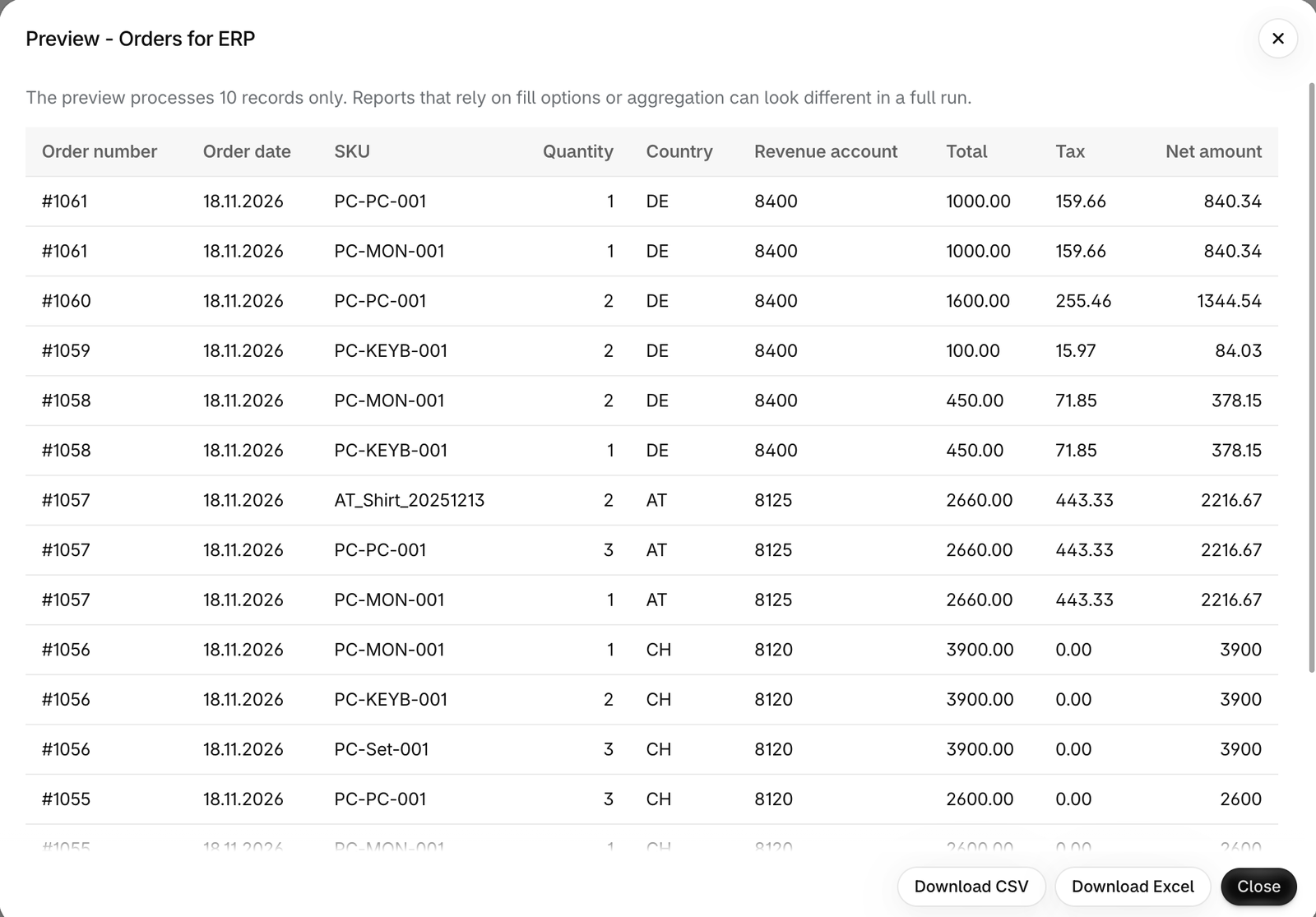
Preview of the report Orders for ERP with country codes, revenue accounts, totals, tax and net amounts
The preview: each country gets its revenue account through a mapping, and the net amount is calculated from total and tax.
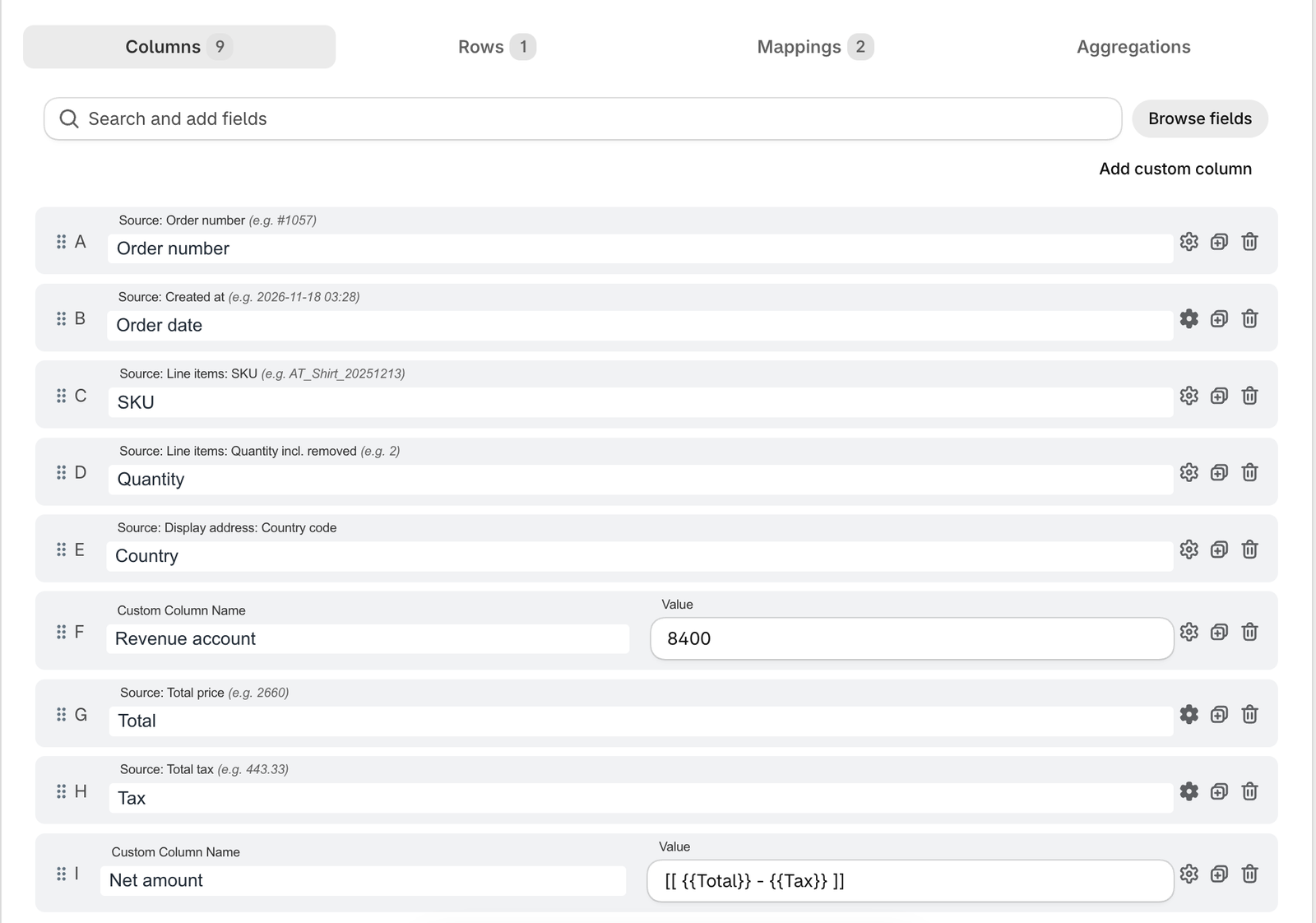
Column list of a report with fields, a custom column and a calculated column
Columns: Shopify fields, a custom column with a fixed value and a calculated column.
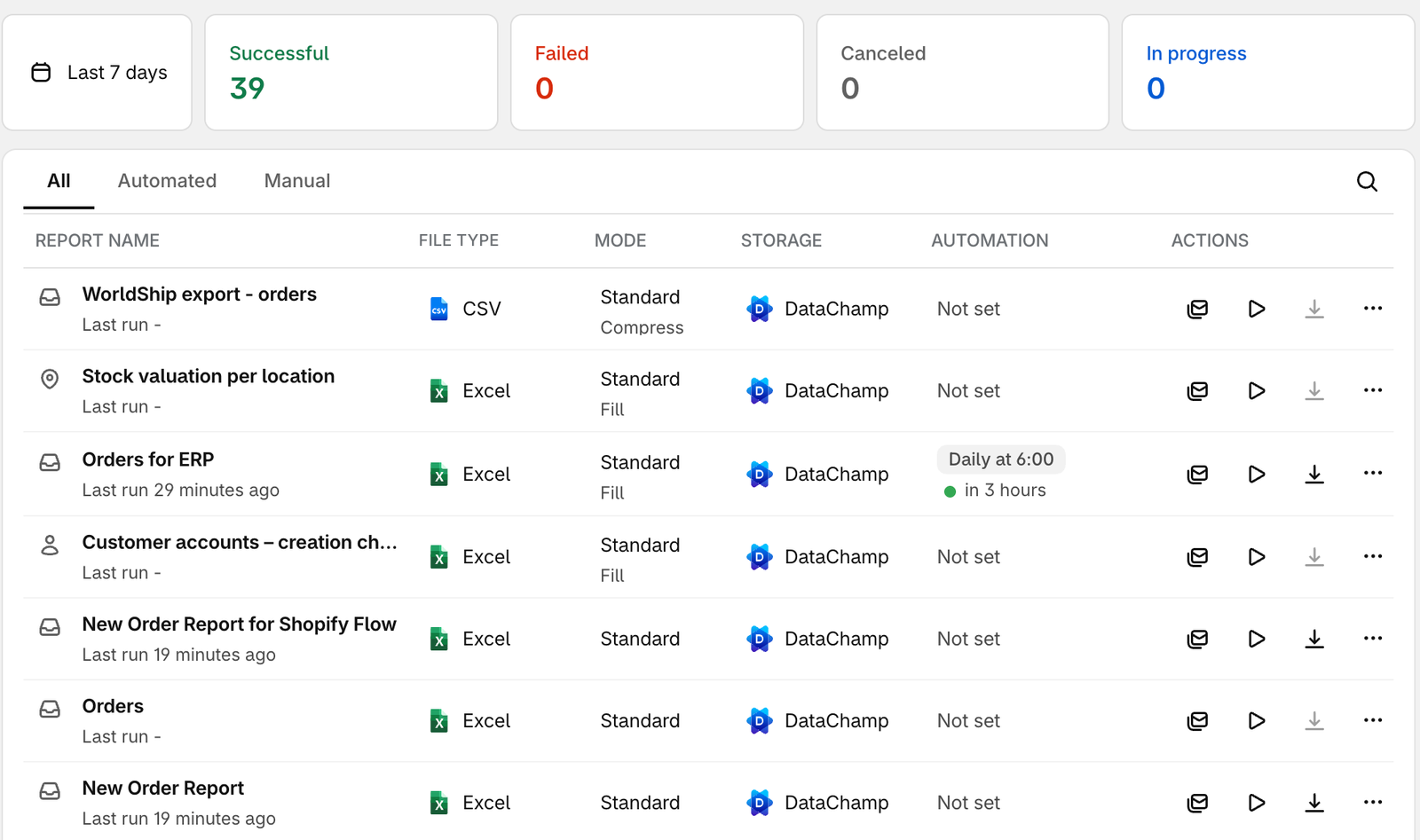
DataChamp dashboard with the report list and a daily schedule
The dashboard: all reports, their storage and the next scheduled run.

Around the report

What keeps it running once it is set up

Preview before you run

See a sample of the file while you build it, before a full export goes anywhere.

Clear errors and logs

When a run fails you see why, and you are notified so nothing goes missing unnoticed.

Support that builds with you

Send us the specification or a sample file. Our team helps you set the report up until the import works.

English, German, French

The app runs inside your Shopify admin in three languages and follows Shopify’s security requirements.

Try every feature for 7 days.

Install DataChamp and build your first report. If the format is tricky, our team builds it with you.